
In short: Social media management covers the monthly plan for an account, content creation, publishing on the planned day and time, monitoring comments and messages, ad management if you want it, and an end-of-month report. Whether photo and video shoots are included varies from agency to agency. Before working with an agency, put the content calendar, the approval process and the report format in writing, and give account access through Meta’s and LinkedIn’s role systems instead of sharing passwords.
When you talk to a social media agency, “monthly social media management” can turn out to mean very different things. One quote may include only design and posting, while another also covers shoots, replying to messages and ads. In this article we answer the question “What does social media management include?” task by task, then explain what to ask an agency for and what to prepare on your side. Once you line quotes up side by side, these items let you check whether you are comparing the same work. If you already have a quote in hand, you can jump straight to the section on what to ask an agency for.
What is social media management and what does it include?
Social media management means running a brand’s Instagram, LinkedIn, TikTok and Facebook accounts on a regular plan. The work follows a cycle that repeats every month. The agency builds the plan at the start of the month, creates the content and publishes what you approve. During the month it monitors comments and messages; at the end it looks at the results and prepares the next month’s plan based on them.
Planning and strategy
The work starts by defining the target audience, the competitors and what will be said on which platform. The monthly form of this strategy is the content calendar. A single table shows which topic goes out on which day, in which format (single post, carousel post, Reels or Stories). We also add special days, campaigns and shoot needs to this calendar.
Content creation
Every row in the calendar becomes a piece of content. Graphic design, caption text, video scripts, editing, on-screen text and cover images are prepared at this stage. Photo and video shoots are also part of production, but they are not in every quote. We cover this difference in the next section.
Publishing and profile setup
Approved content is published on the planned day and time. The bio, links, highlights and profile image are part of the job too. Someone visiting your profile for the first time forms an impression from this setup before looking at individual posts. We recommend choosing posting times from your own account’s analytics rather than from generic lists. We explain how the daily routine works, step by step, on our account management page.
Community management
Replying to comments and messages, knowing how to handle a negative comment and answering frequently asked questions in a consistent voice are the work of community management. We reply to common questions within rules we set together with you, and we pass pricing, order and complaint topics on to you. If you draw this line in writing from the start, two people won’t answer the same message, and it is clear which message is waiting with whom.
Ad management
Organic account management and ad management can be run by the same team, but they are two separately planned jobs. On the ad side you have campaign setup, targeting, ad creatives and testing. The ad budget is separate from the service fee and is paid directly to the ad platform from your ad account. If you want to try ads yourself at first, our guide to advertising on Instagram walks through the setup steps.
Analytics and reporting
At the end of the month, we look at data such as reach, engagement, follower change, profile visits, website clicks and number of messages. A good report adds commentary next to the numbers on why some content got attention and why other content fell behind. We list which of these items we handle monthly on our social media management page.
The difference between social media management with and without shoots
One of the biggest differences between quotes is whether shoots are included in the service. In management without shoots, the agency uses the photos and videos you send together with graphic design. In management with shoots, one or several shoot days are planned each month, and the footage for the content in the calendar is captured in batches on those days.
| Management without shoots | Management with shoots | |
|---|---|---|
| Source of visuals | Photos and videos sent by the business, graphic design | Photos and videos shot by the agency on planned shoot days |
| Reels and video | Editing from the footage you already have | Vertical videos shot from a script and a shot list |
| What the business provides | A steady flow of footage | Venue, time and the people who will appear on camera for the shoot day |
| Who is it for? | Businesses with product visuals ready or that regularly shoot their own content | Businesses that need to show their venue, team or service |
In management without shoots, how well the account runs depends on how regularly you send footage to the agency. If someone on your team shoots regularly with a phone, this model works well. When the flow of footage stops, the calendar stops too, and over time the account fills up with design templates that look alike.
In management with shoots, the work begins before the shoot day. We plan in advance which scene will be shot for which piece of content, who will appear on camera and where on-screen text will sit in a vertical frame. A well-prepared shoot day can yield more than one content series. For Hasret Doğan Pilates we shot photos and videos showing the studio’s atmosphere and the class experience, and we used this footage both on social media and on the website. Reels work and Meta ads were also part of the social media plan in the same project (project details). We explain how shooting, editing and design progress on our content creation page.
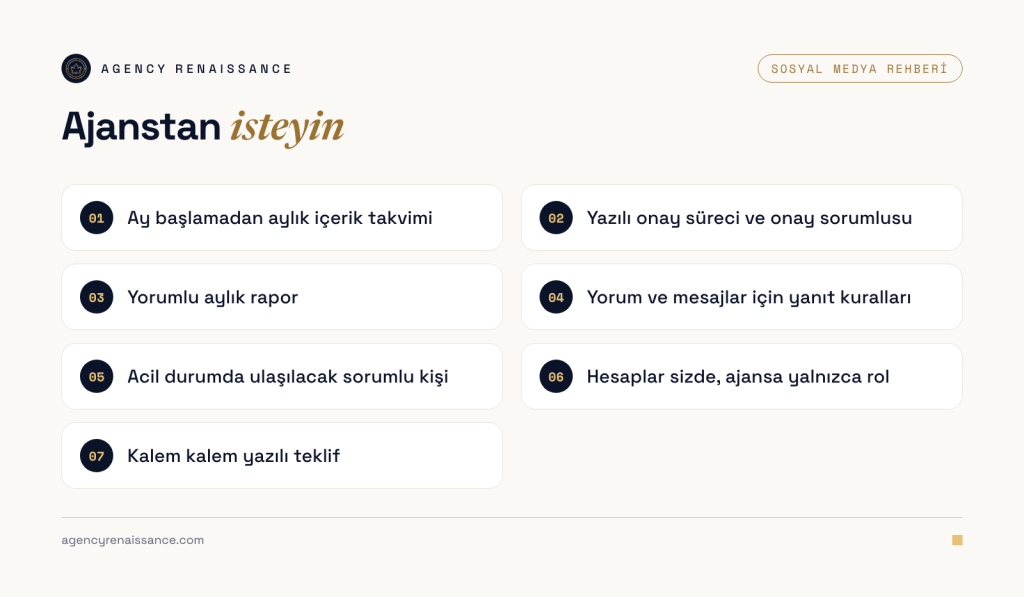
What should you ask a social media agency for?
At the quote stage, ask about how the agency works as well as what content it will produce. Ask to see posts the agency has prepared for a business close to your sector, along with a sample monthly calendar. Get the answers to the topics below in writing after the first call.
Content calendar
Ask for a calendar that shows the whole month before it starts. Each item in the calendar should state its date, format, topic and the platform it will be published on. When you see the calendar in advance, you can add things you know but the agency doesn’t, such as a campaign, a new product or a day when you are closed, in time.
Approval process
No content should be published without your approval. Decide up front who will give the approval, through which channel (email, a shared approval page or a messaging group) and how far ahead of publishing the agency will send the content. Ask how revisions work as well. When it is clear how many rounds of revision a piece of content gets and how notes are passed along, posting days don’t slip.
If you provide healthcare services, plan with the agency to have texts and visuals checked against the Ministry of Health’s promotion regulation (Official Gazette, November 12, 2025) before they are published.
Monthly report
Ask when the report will arrive, which data it will include and whether it will be shared in writing or in a meeting. The easiest way to find out is to ask for a sample report. In the report you should be able to find what was published that month, which content worked well, how results that directly affect your business, such as messages and website clicks, changed, and what will be done differently next month.
Contact person and reply rules
Find out who is responsible for your account at the agency and whom you can reach in an urgent situation, for example when negative comments increase or incorrect information is posted. The hours and topics for which the agency will reply to comments and messages should also be in writing.
Keeping the accounts with you
Your Instagram account, Facebook Page, ad account and LinkedIn page should belong to your business. The agency should connect to these accounts through the role or partner access you grant. That way, when the work ends, you only need to remove the access; past posts, analytics and ad data stay with you. We explain how to do this in the next section.
What should you prepare as a business?
How quickly the agency can start in the first month depends largely on your preparation. We recommend gathering the items below before the first call.
Brand files and materials
A high-resolution logo file (a vector file, if you have one), brand color codes, fonts and the corporate identity guide are the first files we ask for. In addition, share the photos and videos you already have, your product or service list, the questions your customers ask most often and examples of accounts you like or don’t want to resemble at all. You can start without a corporate identity too; we build a simple visual framework from your logo and basic colors.
Meta access: partner or person access instead of a password
Sharing an account password with an agency is a security risk, and it also makes it harder to track who accessed which account once the work is over. Meta and LinkedIn offer role and access systems for this.
Bring your Facebook Page, Instagram account and ad account together in your business portfolio (formerly Business Manager) in Meta Business Suite. Don’t move the accounts into the agency’s portfolio; keep them in your own portfolio and give the agency access from there. According to the Meta Business Help Center, there are two ways to do this:
- If the agency has its own business portfolio, you can add it as a partner. The agency sends you its portfolio ID, and you choose which assets it can access. Only someone with full control of the portfolio can do this.
- If you work with a freelancer or with people from your own team, you can add them to your portfolio as people and assign only the assets they need.
With both methods you choose the level of access: full control, or partial access limited to specific tasks such as creating content, managing ads and replying to messages. Don’t give the agency broader permissions than the work requires. Keep full control of the portfolio with the business, ideally with more than one admin, so you don’t lose access to your accounts if the only admin leaves. Make sure two-step verification is turned on for everyone who has access to the portfolio.
LinkedIn access: Page admin roles
On LinkedIn Pages, permissions are granted through Page admin roles. A super admin has all permissions; they can add and remove other admins, edit all Page information and deactivate the Page. A content admin posts on behalf of the Page, boosts posts, creates events and manages messages, but cannot manage other admins. An analyst can only view and export analytics. For an agency, the content admin role is enough in most cases; keep the super admin role with the business. If you will advertise on LinkedIn, there are separate admin roles for paid media work such as sharing sponsored content.
Response time and approver
Decide how quickly you will respond to content sent for approval and who will give the approval. When approval passes between several people, planned posting days slip. Also settle who on your side will reply to the pricing, order and complaint messages the agency passes on to you, and how quickly. If you will work with shoots, arrange the venue, time and the people who will appear on camera for the shoot day in advance. Also get permission in advance from employees and customers whose footage will be used.
What affects the price of social media management?
There is no single price for social media management that applies to everyone; the scope determines the price. The difference between two quotes usually comes from one of these items:
- The number of platforms to be managed and whether separate content will be prepared for each platform,
- The number and type of monthly content; single images, carousel posts, Reels and Stories take different amounts of preparation,
- The need for shoots, meaning how many shoot days are planned per month, at how many venues, and whether the videos include speaking,
- The scope of community management: the volume of incoming comments and messages and the hours during which replies will be given,
- Whether ad management is included in the service and on how many platforms campaigns will run (the ad budget is separate from the service fee),
- Producing content for multiple branches, brands or languages,
- Sector-specific review and approval steps.
When comparing quotes, line up the items side by side before looking at the total. Of two quotes with the same monthly content count, one may include shoots and Reels editing while the other includes only graphic design. Check whether the report, community management and revision rights are written into the quote. Also talk through the contract term and how access will be removed when the work ends. We give the price as a written quote after a short call where we discuss the scope.
Let’s look at your account together
We will review your profile, your posting routine and the visuals you have, and write to you about what to prioritize in the first 3 months. In the same call we can also settle together which model suits you, with or without shoots. If you have a quote from another agency, bring it along and we will read it together using the topics in this article.
Get in touch. If you prefer, you can also write to us through the WhatsApp button on the site.
Frequently asked questions
Are social media management and content creation the same thing?
Content creation is one part of social media management. Management also covers the monthly plan, publishing, monitoring comments and messages and the end-of-month report. Some quotes include only production, so check item by item which tasks are included.
Do I need to give the agency my account password?
In most cases you don’t. On Meta, you can add the agency to your business portfolio as a partner or as a person, and on LinkedIn you can give it the content admin role. That way the account stays with you, and when the work ends you only need to remove the access.
Is social media management without shoots enough?
If your product visuals are ready or someone on your team shoots regularly, management without shoots can do the job. If your venue, team or service needs to be shown and the flow of footage is irregular, planned shoot days make the account more consistent.
What should a monthly social media report include?
The report should include the content published that month, basic data such as reach and engagement, and results that directly affect your business, such as messages and website clicks. A good report also says why some content worked well and what will change next month.
What happens to my accounts if I stop working with the agency?
If the accounts sit in your business portfolio and under your administration, you only need to remove the agency’s access; past posts, analytics and ad data stay with you. That is why you should open the accounts in your own name from the start and authorize the agency afterward.